







Building a Shopify store is only the first step in your eCommerce journey. While Shopify itself provides a solid foundation, the true growth of your store depends on how effectively you extend its capabilities. This is where Shopify apps come in. These tools help automate tasks, enhance user experience, and improve your store’s overall performance. From marketing automation to conversion optimization, apps play a vital role in scaling a modern online business. However, for beginners, navigating thousands of available apps can feel confusing. That’s why choosing and integrating the right apps strategically is essential for long-term success. At Zilancer, we simplify this process by helping businesses build powerful, streamlined Shopify ecosystems without unnecessary complexity. Shopify apps are essentially plugins or tools that you can integrate into your store to enhance its functionality. They are designed to solve specific problems or improve certain aspects of your business operations. Whether it’s automating repetitive tasks, improving marketing efforts, or boosting conversions, these apps allow you to do more without increasing manual workload. In today’s competitive eCommerce environment, apps are no longer optional—they are a key part of building an efficient and scalable store.
Why App Integration Is Important
App integration is a crucial part of building a powerful and scalable eCommerce store because it allows you to extend your store’s functionality beyond its basic features. No single platform can handle every business need on its own, and that’s where integrations come in—they connect your store with tools that improve marketing, operations, customer experience, and overall efficiency. One of the biggest advantages of app integration is automation. By connecting apps for email marketing, customer support, inventory management, and analytics, you can automate repetitive tasks that would otherwise take hours to manage manually. This not only saves time but also reduces the risk of human error, allowing you to focus more on strategy and growth. App integration also enhances customer experience. Features like live chat, personalized recommendations, review systems, and fast checkout options can all be added through apps. These improvements make your store more interactive, trustworthy, and user-friendly, which directly impacts conversion rates and customer satisfaction.
Another key benefit is better data and insights. Integrated apps allow you to track customer behavior, sales performance, and marketing results in real time. With this data, you can make informed decisions, optimize campaigns, and identify opportunities for improvement. Without proper integration, valuable data often remains scattered and underutilized. Scalability is also a major reason why app integration is important. As your business grows, your needs become more complex. Integrations allow you to add new features and systems without rebuilding your store from scratch. Whether it’s expanding to new sales channels, managing larger inventories, or running advanced marketing campaigns, integrated tools make scaling much easier.Finally, app integration creates a more connected ecosystem. Instead of using multiple disconnected tools, everything works together seamlessly, improving workflow and overall efficiency. This unified approach helps businesses operate more smoothly and deliver a consistent experience across all touchpoints.
Types of Shopify Apps You Should Know
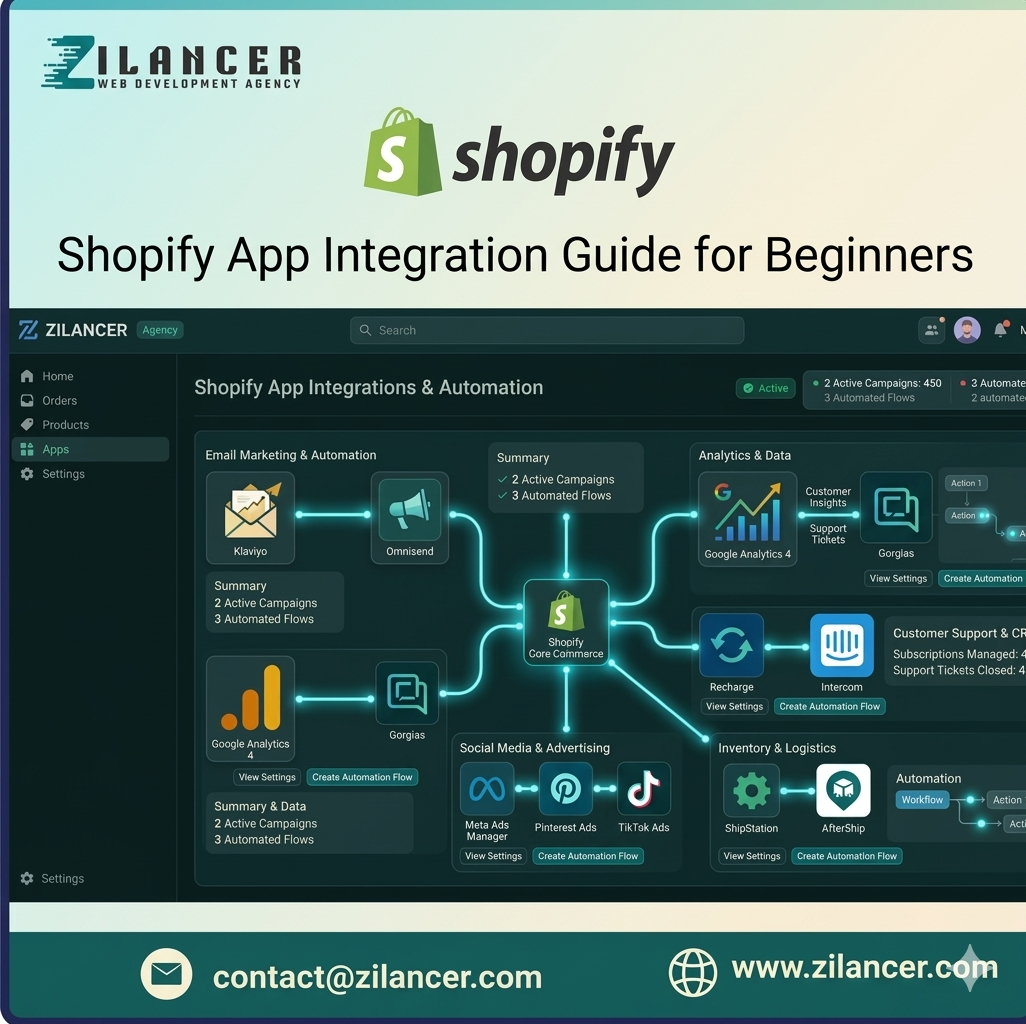
When building and scaling an online store with Shopify, understanding the different types of apps available is essential. Shopify’s app ecosystem allows you to extend your store’s functionality, automate processes, and improve customer experience without complex development. Knowing which types of apps to use can make a significant difference in your store’s performance and growth. One of the most important categories is marketing and conversion apps. These include tools for email marketing, abandoned cart recovery, pop-ups, upselling, and retargeting. They help you attract visitors, engage them effectively, and turn them into paying customers. Without strong marketing apps, even a well-designed store can struggle to generate consistent sales. Another key category is SEO and analytics apps. These tools help optimize your store for search engines, improve rankings, and track performance. They provide insights into traffic sources, customer behavior, and conversion data, allowing you to make smarter, data-driven decisions. Product and inventory management apps are also essential, especially as your business grows. These apps help you manage stock levels, sync inventory across multiple channels, and automate product updates. This ensures that your operations remain smooth and efficient, even with a large number of products.
Customer support and engagement apps play a major role in building trust and improving user experience. Live chat, help desks, review systems, and FAQ tools make it easier to assist customers and address their concerns quickly. Better support leads to higher satisfaction and repeat purchases. Shipping and fulfillment apps are another important category. They help automate order processing, calculate shipping rates, generate labels, and track deliveries. This not only saves time but also ensures a more reliable and transparent delivery experience for customers. Finally, design and customization apps allow you to enhance the look and functionality of your store without coding. From page builders to custom sections and UI improvements, these apps help create a more professional and unique storefront. In summary, Shopify apps cover every aspect of running an online business—from marketing and operations to customer experience and design. Choosing the right combination of apps allows you to build a more efficient, scalable, and high-performing store that can grow with your business.
Marketing Apps
Marketing apps are essential for attracting and engaging customers. These tools include email marketing platforms, SMS marketing systems, and social media integrations. They help you build relationships with your audience, drive targeted traffic, and increase brand awareness. With the right marketing apps, you can create consistent communication that turns visitors into loyal customers. Conversion-focused apps are designed to turn visitors into buyers. They enhance the shopping experience by building trust and creating urgency. Features like product reviews, upsell and cross-sell tools, and countdown timers encourage customers to make purchase decisions faster. These apps directly impact your revenue by improving your store’s conversion rate. Data plays a crucial role in growing any eCommerce business. Analytics apps provide valuable insights into customer behavior, sales performance, and traffic sources. With this information, you can make informed decisions and continuously optimize your strategies. Instead of guessing what works, you rely on real data to guide your growth. Customer experience can make or break your Shopify store. Support apps such as live chat tools, helpdesk systems, and FAQ builders allow you to respond quickly to customer inquiries. Faster responses build trust, improve satisfaction, and increase the chances of repeat purchases. A strong support system shows customers that your brand is reliable and customer-focused. Behind every successful store is a well-managed backend system. Inventory and operations apps help you handle stock management, order tracking, shipping, and fulfillment efficiently. These tools ensure that your business runs smoothly without errors, allowing you to focus on growth instead of manual operations.
How to Choose the Right Apps
Selecting the right apps is one of the most important decisions for beginners. Many store owners make the mistake of installing too many apps, which can slow down their website and create unnecessary complications. Instead, focus on your business goals and choose apps that directly support them. Always check app reviews, ratings, compatibility with your theme, and pricing structure. It’s better to use a few high-quality apps that deliver real value than to overload your store with unnecessary tools. Zilancer helps businesses make smart choices by selecting apps that align perfectly with their goals and growth strategy. Integrating Shopify apps becomes simple when you follow a structured approach. Start by identifying your store’s needs—whether it’s marketing, conversion improvement, or automation. Once your goals are clear, explore the Shopify App Store and compare different options based on features and reviews. After selecting an app, install it by clicking “Add app” and following the setup instructions. The next step is configuration, where you customize the app settings according to your store requirements. Before making it live, always test the app to ensure it functions properly and doesn’t conflict with other features. Finally, monitor its performance regularly and make adjustments to optimize results. To get the best results from your Shopify apps, it’s important to follow a few proven practices. Avoid installing too many apps at once, as this can slow down your store. Regularly update and maintain your apps to ensure smooth performance. Remove any apps that are no longer useful or underperforming. Always test your store after integrating a new app to identify potential issues early. A clean, optimized setup leads to better speed, improved user experience, and higher conversions. Many beginners unknowingly make mistakes that affect their store’s performance. One of the most common issues is installing too many apps without a clear strategy. Ignoring compatibility between apps and themes can also lead to technical problems. Another major mistake is not testing apps before launching them live. Additionally, overlooking site speed can negatively impact both user experience and SEO rankings. Avoiding these mistakes will help you maintain a stable and high-performing store.
How Zilancer Helps You with Shopify App Integration
At Zilancer, we understand that the right tools can make a huge difference in your Shopify store’s success. Our approach focuses on selecting only the most effective apps tailored to your specific business needs. We ensure seamless integration, proper setup, and performance optimization so that your store runs efficiently. Beyond setup, we provide ongoing support and improvements to help you scale faster and achieve better results. Shopify apps have the power to transform your store into a high-performing eCommerce business, but success depends on how you use them. By choosing the right apps, integrating them properly, and continuously optimizing your setup, you can build a store that is both efficient and scalable. Instead of complicating your system, focus on creating a streamlined app ecosystem that supports your growth. If you want to simplify the process and maximize your results, Zilancer is here to help you build a smarter, more profitable Shopify store.